This Black Friday, on Friday 27 November, many customers will not start by searching on Google or by visiting your shop: first they will ask an artificial intelligence. According to the Spain fact sheet of Shopify's holiday report, based on a survey of 2,000 consumers in July, 76% of shoppers in Spain will use AI for at least one shopping task this season. That AI does not know your catalogue by instinct. It knows it from the data on your website and in Google, and if that data is incomplete or inconsistent, it will recommend another shop. Below we explain what to check in WooCommerce and Shopify before 27 November, and when it is better to leave things alone.
What the numbers say about this season
Shopify's survey in Spain describes a shopper who looks harder at every euro and uses AI to decide:
- 76% will use AI for at least one shopping task. 55% are happy for it to recommend which product to choose, 38% for it to build their cart and only 30% for it to buy on their behalf.
- 26% leave products in the cart waiting for the price to drop, and what most often makes them buy is exactly that drop (33%).
- Planned spending for the Black Friday weekend falls from 182 to 175 euros.
- Even so, 78% of the businesses surveyed expect to sell more than last year.
There is another figure worth keeping in view. According to CNMC figures, e-commerce in Spain turned over 29,643 million euros in the first quarter of 2026, 15.1% more than a year earlier, but 56% of that turnover was purchases made from Spain on foreign websites. If an AI recommends the big foreign shop because it is the one with complete data, the local shop loses the sale before the customer ever sees it.
Our reading: AI already decides which shops make it into the conversation, but most people want to make the final click themselves. Shopify sums it up in its global holiday report: AI tools do not browse the way people do and need accurate, structured product data. That is why its Agentic Storefronts, which show products from Shopify stores in ChatGPT and Gemini, start from a catalogue whose data is already in order.
What AI reads from your product page
For Google the answer is official and it is in its guide to generative AI features in Search: optimising for AI search is still SEO, structured data is not required for those features and there is no special markup for AI, although Google recommends keeping it because it makes pages eligible for rich results. Be wary of anyone selling you a trick to appear in AI answers.
What does count is the product page itself: a name that says what the product is, a description with sizes, materials and who it is for, real photos, and shipping costs and returns visible before the cart. Google lists which details it reads from a product page in its merchant listing documentation: price, availability, shipping and returns, among others. WooCommerce outputs this markup by default, as you can see in its structured data code: it publishes the name, SKU, price, sale price with its end date, availability and the GTIN when it is valid. Shopify gives themes a Liquid filter for this markup, but whether it appears depends on the theme using it, so custom themes need checking.
The same price and the same stock everywhere
A common fault is one price on the website and another on Google Shopping. The official extensions connect the catalogue to Merchant Center. In WooCommerce that is Google for WooCommerce, which syncs prices, promotions and inventory; in Shopify, the Google & YouTube app, which sends products, deals and shipping. Merchant Center can also correct price and availability by reading the structured data on your product pages, through its automatic item updates. Google warns about three things: they do not replace an up-to-date feed, a product can be disapproved if a mismatch is found, and they should not be switched on if your pages show several crossed-out prices.
Crossed-out prices: the previous price is the lowest of the last 30 days
In Spain, when you advertise a price reduction, the previous price you show must be the lowest price you applied to that same product in the preceding 30 days. The rule is in article 20 of Spain's Retail Trade Act, in this wording since 28 May 2022, and it comes from the 2019 EU consumer protection directive, so the rule applies across the European Union. On both platforms the crossed-out price comes from a field someone fills in: in WooCommerce, the product's regular price; in Shopify, the Compare-at price field.
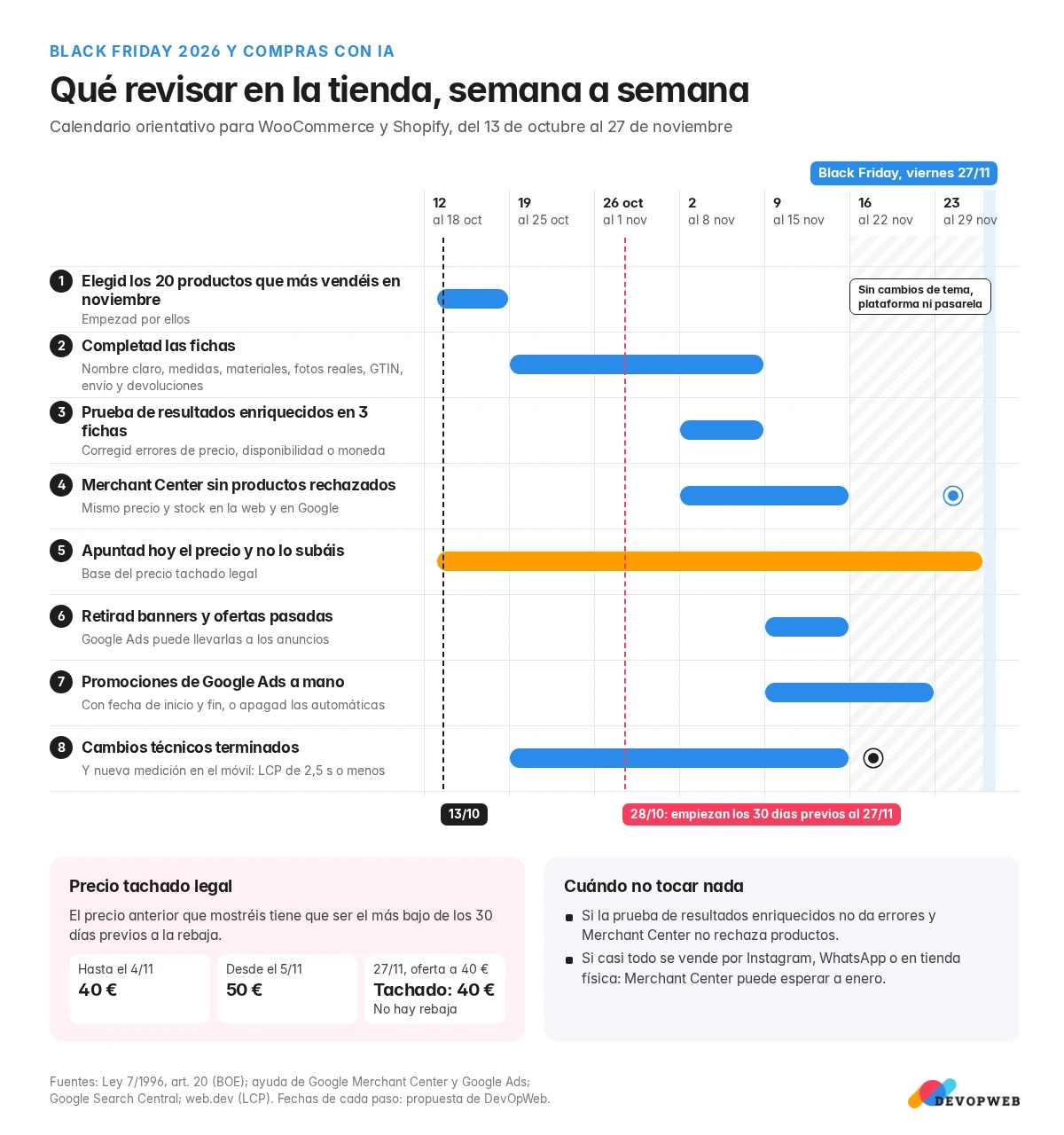
A typical case: a product costs 40 euros, on 5 November it goes up to 50 and on the 27th it is advertised at 40 with 50 crossed out. In the previous 30 days it sold at 40, so that is the only previous price that can be shown, and then there is no reduction left to advertise. So avoid raising prices in the weeks before.
Expired offers: now they can end up in your ads too
This ties in with a recent Google Ads feature, automated promotions. Google reads the offers on your landing pages (its example is 20% off black sweaters) and adds them to ads in Search and Performance Max campaigns that have location assets and no manual promotion running. Each promotion serves for less than 24 hours and is renewed as long as it is still visible on your website. Google says it only shows active offers, but a summer banner nobody removed looks active too.
If you advertise a physical shop on Google Ads, decide whether you want this feature. It is switched off under Assets, Account level automated assets, Advanced settings. Our recommendation for this season is to create the Black Friday promotions by hand, with a start and end date, because campaigns with a manual promotion are left out of automated ones.
Speed on mobile
Google's recommendation for Largest Contentful Paint, its loading metric, is that the main element of a page appears within 2.5 seconds, and that this holds for 75% of visits, on mobile and desktop separately. Measure your homepage, your three best-selling product pages and the cart with PageSpeed Insights, in the mobile view. If you are above that, start with images and with plugins or scripts you no longer use.
Checklist before 27 November
- Pick the 20 products you sell most in November and start with them.
- Complete each product page: a clear name, a description with sizes and materials, real photos, a GTIN if the product has one, and visible shipping and returns.
- Run three of those pages through the Rich Results Test, and fix any errors in price, availability or currency.
- Check in Merchant Center that no products are disapproved for price or stock mismatches with the website.
- Write down today the price of every campaign product and do not raise it before Black Friday.
- Look for banners, pop-ups and pages from past offers on the website, and take them down.
- Create Google Ads promotions by hand with start and end dates, or switch off the automated ones.
- Finish any technical change by mid-November and measure again on mobile.
When it is not worth touching anything
Not everything pays off a few weeks before the campaign. Our view:
- If almost all your sales come through Instagram, WhatsApp or the physical shop, clear product pages and correct prices are enough; setting up Merchant Center can wait until January.
- If the Rich Results Test shows no errors and Merchant Center disapproves no products, leave the data as it is.
- Do not change theme, platform or payment gateway in November: any fault shows up exactly when traffic peaks.
- Do not rewrite every description with AI at the last minute. Google asks for that content to be reviewed by hand before publishing, including titles and structured data, according to its guidance on AI-generated content.
Our recommendation
For a small or medium-sized shop, the work that pays off most before Black Friday is unglamorous: complete product pages, the same price everywhere, lawful crossed-out prices and no old offer in sight. That helps the AI and also the person who ends up buying. If your product pages, feed or Merchant Center need a review, we do it as part of our online shop maintenance, and if the problem is speed on mobile, through our web performance work.
Want your shop checked before 27 November?
Send us your shop address. We will check your product pages, prices and mobile speed and tell you what is worth fixing before Black Friday and what can wait until January.