If you have a website, you probably pay for two things every year with slightly odd names: the domain and the hosting. Plenty of people mix them up, mostly because hardly anyone explains them. One simple picture makes it clear: an address and a shop. Here is the plain version, plus what happens if one of them expires and how to check that both are in your business's name.
The domain is the address
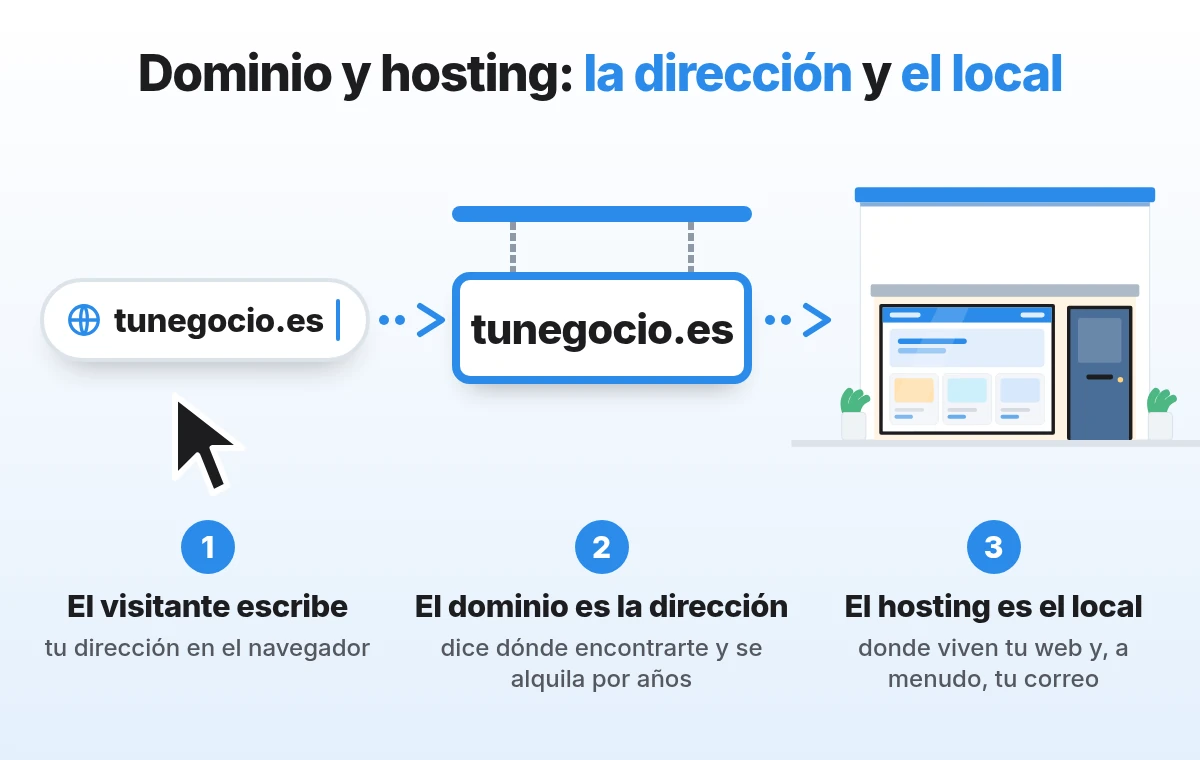
The domain is your website's name, for example yourbusiness.com: what people type into the browser and what comes after the @ in your email, as in [email protected]. It works like a street address: it tells people where to find you, but it is not the shop itself. And you do not buy it forever, you rent it by the year. A Spanish .es domain, for instance, can be renewed for 1, 2, 3, 4, 5 or 10 years, according to Dominios.es, the .es registry run by Red.es.
There are a great many of them. Taking Spain as an example, there were 2,257,455 registered .es domains in September 2026, around 115,000 more than in October 2025, according to the September statistics from Red.es. Almost all of them, 99.65%, are managed through a registrar, one of the accredited companies that register and renew domains, according to the report for the first half of 2026.
Hosting is the shop
Hosting is the shop where your website lives. It is a computer that stays on day and night in a data centre, holding texts, photos and products and showing them to whoever walks in. It often holds your email too. If the domain is the address on the sign, the hosting is the shop with its shutter up.
The two work as a pair. When someone types yourbusiness.com, the domain says which shop to go to and the hosting opens the door. Email works like a letter: the address takes it to the shop and the shop receives it.
Why you pay for them separately
They are two different services: a registrar renews the domain and a hosting company provides the hosting. Sometimes it is the same company and everything arrives together; other times there are two, with two invoices and two renewal dates. Both ways are fine. What matters is knowing what you have and where. To tell them apart on your invoices:
- If it mentions domain registration or renewal and shows your website's name with its ending, it is the domain.
- If it mentions hosting, a plan, storage in GB or mailboxes, it is the hosting.
- If everything comes in one bundle, ask which part is which and when each one expires.
What happens if one of them expires
Usually nothing happens at all: both get renewed and that is it. Still, it helps to know what each case looks like.
- If the hosting expires, the address still exists, but the shop is closed. Visitors do not see your website and, if your email lived there, that stops working as well.
- If the domain expires, the shop is still open, but nobody can find it. The website no longer shows up at your address and emails to [email protected] stop arriving.
- If the domain is not renewed, it is eventually cancelled and the name becomes free again for someone else to register.
Letting a domain lapse is more common than you might think. In September 2026 there were 26,561 cancellations of .es domains, and 26,450 of them were domains that had not been renewed, according to the same Red.es statistics. Many are dropped on purpose, because the project closed or the name is no longer used. And once a domain is cancelled, its name becomes available, as explained by Dominios.es on cancellations.
The reassuring part is that there are reminders. With .es, if the registrar has not requested the renewal five days before expiry, Dominios.es emails the administrative contact, the person the holder chooses to manage the domain. That is why it needs to be an inbox you actually read. And most people get it right: in the first half of 2026, the .es renewal rate was 84.25%, according to the Red.es half-year report.
Why both should be in your business's name
With a domain, the registered holder and their administrative contact are the ones who can request changes, such as transferring it to a new holder or cancelling it. Sometimes the domain was registered by whoever built the website, a relative or a former partner, in their own name and with their own email. As long as things go smoothly, nobody notices. The day you want to switch provider, or that person is no longer around, everything takes longer.
If it is not in your name, it can be fixed. For .es, the procedure is called a transfer of holder, explained step by step in the Dominios.es guide to changing the holder. Hosting is similar: the account should be in the business's name, with one of your own email addresses, and you should be able to log in to the control panel even if someone else looks after it.
How to check whose name your domain is in
This lookup has an odd name, WHOIS, which simply means who is. It is free and takes a couple of minutes:
- If your website ends in .es, go to the home page of Dominios.es, type the name without the .es and press Comprobar (Check).
- Next to your domain you will see "Registrado. Ver datos" (Registered. View data). Click Ver datos and then Continuar.
- You will see the holder, the expiry date and the registrar. If it is registered to a company, the company's name appears: make sure it is yours and note down the date.
- If your website ends in .com or another generic ending, use the ICANN lookup tool, run by the organisation that coordinates domain names on the internet. It usually shows the registrar and the expiry date; the holder is often hidden for privacy, and you will find it in your account with that registrar. Other country endings, such as .de or .co.uk, have their own registry with a similar lookup.
- There is no public lookup for hosting. Check whose name is on the invoice and who has the password to the control panel.
What to check on each one
- Automatic renewal, switched on for both the domain and the hosting, with a card that is not about to expire.
- The email address for reminders, one you read every day and ideally not on the same domain, so it does not stop arriving exactly when you need it.
- Where your email lives, on the hosting or on another service, so nobody deletes it by accident when changing hosting.
- Backups, made by the hosting, at an interval you know, and also stored away from that same server.
- The logins for both control panels, in the business's name and kept somewhere safe, even if someone else manages them.
Our recommendation
Look up both expiry dates today, the domain's and the hosting's, and put them in your calendar with a month to spare. With that, and both control panels in your name, you have the most important part covered. If you are thinking about moving your hosting or would rather have your website and hosting with a single point of contact, you can see how we work in our WordPress hosting plans.
Do you know when your domain and your hosting expire, and whose name they are in?
Ask for our free website review: within 24 hours we send you 3 concrete recommendations by WhatsApp, with no commitment.