On 21 October 2026 the PHP project released a security update of the kind that should be applied without waiting. It fixes two critical vulnerabilities that, under certain conditions, let an outsider run their own code on a website's server without needing a password. If your online shop or business website is built on WordPress, WooCommerce, PrestaShop, Magento or Shopware, it runs on PHP. Here is what happened, how we handled it on the servers we maintain, and what is worth checking on your own site this week.
What happened
PHP (PHP: Hypertext Preprocessor) is the programming language behind WordPress and every shop platform we have just mentioned. That day the project released versions 8.5.12, 8.4.27, 8.3.36 and 8.2.35 to fix two vulnerabilities registered as CVE-2026-109618 and CVE-2026-109619. CVE (Common Vulnerabilities and Exposures) is the public catalogue that gives every known security flaw its own unique number.
According to the official PHP advisory, both flaws can allow unauthenticated remote code execution, usually shortened to RCE (Remote Code Execution). Put simply, an attacker could run instructions on your server without logging in. The advisory adds that every PHP installation serving web requests is at risk, and that the risk is highest on servers running Apache with mod_php, where a demonstrated exploit fires before the website's own code even runs. The PHP 8.4.27 release announcement, for example, labels it a security release and encourages every user of that branch to upgrade.
Severity is measured with CVSS (Common Vulnerability Scoring System), a scale from 0 to 10. Both vulnerabilities score 9.2 on version 4 of that scale, which is the critical range. The PHP Foundation explains that on 20 October the two CVE numbers started circulating on forums and social media with a wrong score of 10.0, so the release was brought forward by a day, to 21 October at 14:00 Coordinated Universal Time (UTC). No technical details leaked. The Dutch National Cyber Security Centre (NCSC-NL, Nationaal Cyber Security Centrum) keeps a tracking page called php2shell listing affected software and the status of each vendor.
Why the WordPress dashboard will not fix it
As Wordfence, one of the best known security companies in the WordPress world, points out, the flaw sits in PHP itself, not in WordPress, a plugin or a theme. That is why WordPress automatic updates do not fix it: PHP is updated on the server. If your site is on managed hosting, that is your provider's job. If it is on your own server or a VPS (virtual private server), it is the job of whoever administers it. And if nobody has been given that job, it is most likely still waiting to be done.
How we applied it
On the same day the patch was released, 3 minutes after it came out, we had already updated every server we maintain. We moved PHP 8.2, 8.3, 8.4 and 8.5 to their fixed versions and, in the same maintenance window, also updated nginx, the web server, OpenSSL, the library that encrypts connections, and the other system libraries with pending updates. We then restarted the services and checked that every website was responding correctly.
We are not telling this to show off about speed. A few minutes was enough because three things were already in place before the advisory: the servers ran supported PHP versions, we knew which version each site uses, and the update procedure had been tested. When any of those three is missing, the same patch can take days, or simply cannot be applied.
What matters most: unsupported versions
The PHP project has only released fixed versions of PHP 8.2, 8.3, 8.4 and 8.5. The same official advisory makes it clear that PHP 8.1 and older no longer receive updates from the PHP project. Given the severity, the PHP security team provided minimal patches for 7.4, 8.0 and 8.1 aimed at people who build PHP from source, and some distribution repositories have adapted them for their packages. For example, the repository run by Remi Collet, who maintains the PHP packages for Fedora and Red Hat and whose repository is widely used on AlmaLinux and Rocky Linux, released the fix for these two flaws for PHP 7.4, 8.0 and 8.1 on 21 October.
So if your site runs an old version, your provider may have installed an adapted patch, but that is not guaranteed: it depends on where your server's PHP comes from and on someone having updated it. Even if it is there, those versions remain outside official support, so the next flaw may never get a fix. You need to check it and plan the move.
The official list of unsupported branches gives the dates: PHP 8.1 lost support on 31 December 2025, PHP 8.0 on 26 November 2023 and PHP 7.4 on 28 November 2022. In practice, if your site runs on PHP 7.x, 8.0 or 8.1 and nobody looks after the server, it is most likely exposed to these two flaws today, and with every new flaw it will depend on someone adapting the fix.
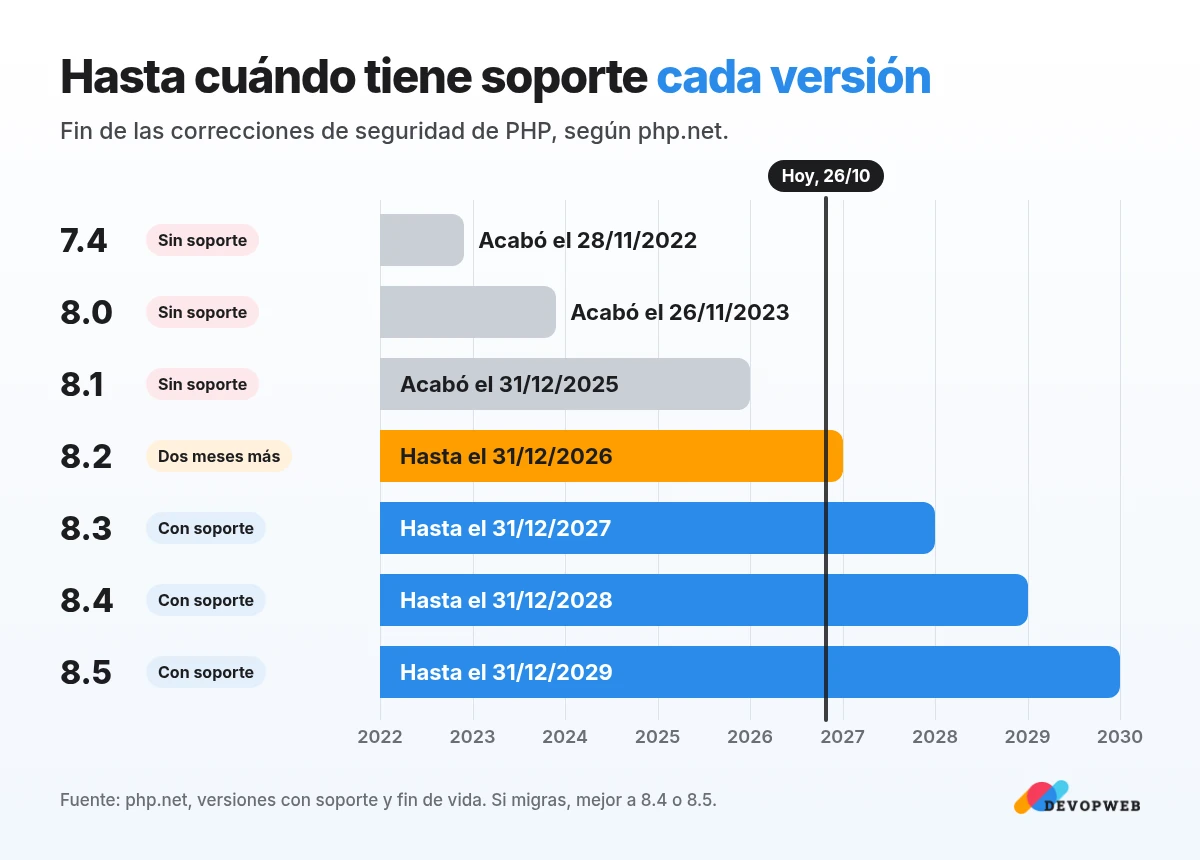
There is one more date worth noting. According to the table of supported versions, PHP 8.2 receives security fixes only until 31 December 2026, which means two more months. PHP 8.3 keeps them until 31 December 2027, 8.4 until the end of 2028 and 8.5 until the end of 2029. If you have to migrate anyway, it makes sense to go straight to 8.4 or 8.5.
What to do with your site
- Check which PHP version it runs. In WordPress you will find it under Tools, Site Health, Info tab, Server section, the path Wordfence points to. On other platforms it is usually shown in the hosting control panel.
- Compare it with the fixed versions: 8.5.12, 8.4.27, 8.3.36, 8.2.35 or later. If your PHP comes from a Linux distribution's packages, the number may not change even after the patch is applied, so in that case confirm it with your provider.
- If your version is supported but not up to date, ask your host or whoever runs the server to update it, with a fresh backup taken first.
- If your version is no longer supported, ask your provider whether the adapted patch has been installed and, even if it has, plan the move to a current version. Before that, check that your theme, plugins and custom code work with it, on a copy of the site rather than on the live shop.
- Put in writing who is responsible for these updates from now on, so the next advisory does not depend on someone remembering.
Our recommendation
Do the check in step 1 today; it takes a couple of minutes. If your version is up to date, good. If it is not, or if you find out that nobody had been given this job, now is a good time to sort it out calmly, before the next advisory. With our maintenance and growth service we keep websites fast and secure after launch, and that includes keeping the server up to date.
Do you know which PHP version your website runs on?
Ask for our free website review: we check your PHP version and whether it is up to date, and within 24 hours we send you 3 concrete recommendations by WhatsApp, with no commitment.