On 31 December 2026, PHP 8.2 stops receiving security fixes. At the start of October 2026, the WordPress.org statistics show that about one in four WordPress sites still runs on it, and more than a third run on PHP versions that no longer get any fixes at all. Most of those owners never chose to stay there; in many cases nobody was checking which version the server ran.
That is what a maintenance plan is for. In this article we explain what we consider the minimum for a WordPress site or a WooCommerce shop, why clicking Update all is not enough, and which questions to ask before you sign a maintenance contract.
Why clicking Update is not a maintenance plan
The Patchstack report on 2025 counted 11,334 new vulnerabilities in the WordPress ecosystem, 42% more than the year before. 91% were found in plugins, 9% in themes and only 6 in WordPress core. For the most heavily exploited ones, the median time to mass exploitation was 5 hours.
Two conclusions follow. The risk sits in the plugins you install, so having fewer of them, and well maintained ones, matters more than any setting. And a site that gets updated whenever someone remembers stays exposed for days or weeks. The same report found that 46% of vulnerabilities had no fix when they were made public. In those cases there is nothing to update yet, and the only defence is to remove the plugin or block the attack with a firewall rule.
Updating blindly has its own risk. A WooCommerce update that changes the checkout templates, a page builder that breaks the layout, a payment plugin that suddenly needs a newer PHP version: any of the three can take down a shop that was fully up to date. Maintenance means updating often and checking afterwards that everything still works.
What a monthly maintenance plan should include
This is what we consider the minimum. The frequency depends on the site: a company website with a contact form needs less attention than a shop that takes orders every day.
1. Updates tested on a copy first
Core, plugin and theme updates go first to a staging copy, a private clone of the site. There we check the pages that bring in money or contacts: the home page, a product, the cart, the checkout with a test payment and the contact form. Only then do the updates reach the live site, with a backup taken minutes before. A security release that fixes a flaw already under attack skips the queue and goes out the same day.
WordPress can update plugins and themes automatically. We turn this on for small, low risk plugins and keep WooCommerce, the page builder and payment plugins on manual updates that are tested first.
2. Backups that have been restored at least once
Nobody knows whether a backup works until it has been restored at least once. Files and database should be copied every day and stored outside the server that hosts the site, as the WordPress documentation on backups also recommends, so a server failure or a compromised account does not take the copies with it. In a shop the database deserves more frequent copies, because orders keep coming in all day.

Every few months, restore one backup to a test environment and check that the site comes up and the latest orders are there. Ask your provider where the backups are kept, how many days back you can go and when they last tested a restore. If the answer to the last question is never, that is the first thing to fix.
3. PHP and server versions
PHP is the language WordPress runs on, and each version receives security fixes for a limited time. WordPress recommends PHP 8.3 or newer. These are the end dates published by the PHP project:
- PHP 8.1 and older: no security fixes since 31 December 2025.
- PHP 8.2: security fixes until 31 December 2026.
- PHP 8.3: until 31 December 2027.
- PHP 8.4: until 31 December 2028.
- PHP 8.5: until 31 December 2029.
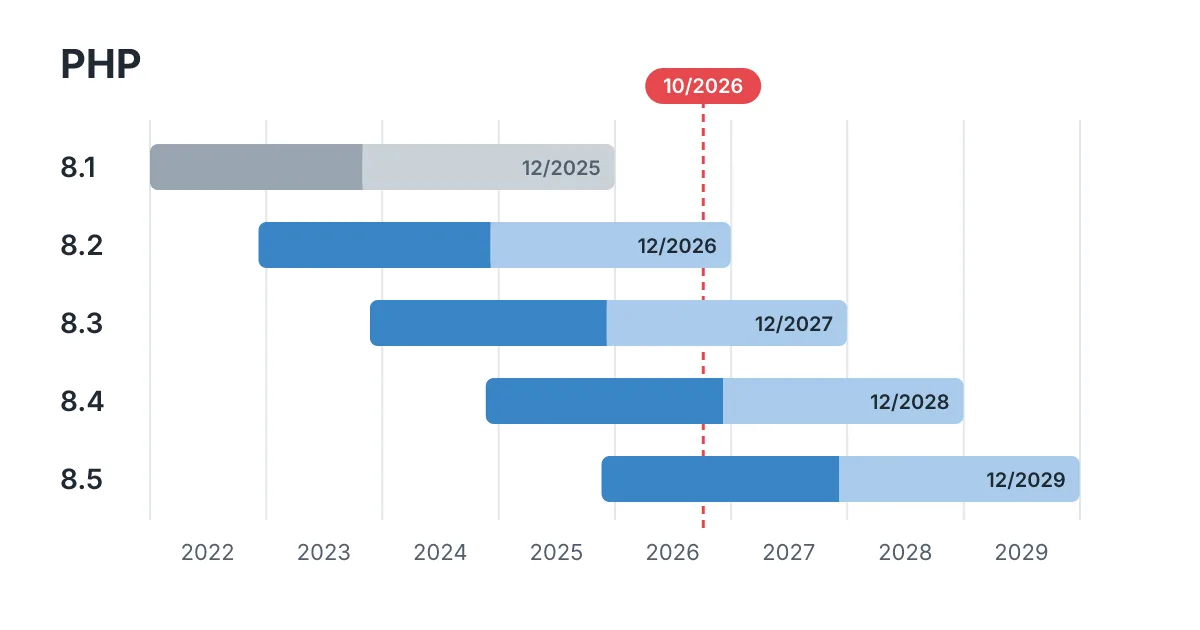
Moving to a newer PHP version usually means an afternoon on the staging copy: switch the version, browse the site, read the error log, then update or replace the plugins that complain. Planned now, that is a calm afternoon; in the last week of December it is an emergency. Some hosting providers and Linux distributions keep patching older versions on their own, so ask yours. If they do not, a site on PHP 8.1 or older is already running without security fixes, and a site on 8.2 should move before the end of the year.
4. Security beyond updates
- Review user accounts: no shared logins, no former staff or agencies with administrator access, and two factor authentication for every administrator.
- Delete plugins and themes that are inactive or abandoned by their authors. Deactivating is not enough, because the files stay on the server.
- A web application firewall (WAF) that blocks known attacks, which covers the gap while a fix does not exist yet.
- Check for modified core files and for unexpected PHP files in the uploads folder, a common place to hide injected code.
5. Monitoring
The site should be checked every few minutes from outside, so a failure is noticed before a customer calls. The same goes for the expiry dates of the SSL certificate and the domain. Send a test through the contact form and place a test order now and then: a form that silently stops sending emails is one of the most expensive failures and one of the hardest to notice.
6. Speed and a short monthly report
Once a month, look at mobile loading speed with PageSpeed Insights, the size of the database and the slowest pages. Then a short report: what was updated, what was blocked, what changed in speed and what we recommend for next month. It should be short enough to read in two minutes, or it will go unread.
What maintenance does not cover
A maintenance plan keeps the site safe and working. It does not include new features, redesigns, new pages or content changes, and the contract should say so in writing. Plans that promise unlimited changes tend to end with the changes done slowly or the maintenance done badly. We prefer a clear monthly scope, and a separate quote or a small bank of hours for everything else.
Doing it yourself: a monthly checklist
If you look after the site yourself, this is the minimum we would do every month:
- Take a full backup and keep a copy outside the server.
- Open Tools, Site Health in the WordPress dashboard. It warns about an outdated PHP version and other problems.
- Update on a staging copy if your hosting offers one. If not, update one plugin at a time and check the home page, the cart and the contact form after each one.
- Delete the plugins and themes you do not use.
- Review the user list and remove anyone who no longer needs access.
- Send a test message through every form on the site.
- Write down the PHP version and the date of the last backup you restored.
If any step takes you more than an hour, or you would rather not touch a live shop yourself, it is worth handing it over.
How to compare maintenance offers
Prices vary a lot between providers, and the cheapest plans often cover little more than automatic updates. Before you sign, ask these questions:
- Where are the backups stored, for how long, and when was the last restore test?
- Are updates tested on a copy before they reach the live site?
- What happens if an update breaks something, and how fast do you respond?
- Who changes the PHP version, and when?
- What is included each month, and how are other changes billed?
A provider who does this properly answers with specifics: where the copies are, how many days they cover and the date of the last test.
Maintenance is part of our work on WordPress websites and WooCommerce shops, together with speed and performance work.
Not sure how your site is maintained today?
Send us the address of your site and tell us how it is looked after now. We will tell you what is missing and what a maintenance plan for your site would include.